Describe the work
Choose a currency and estimate hours, the cost of your time and expenses. Start with an example if you prefer.
For freelancers and small service businesses
Work out what to charge, what that price covers and what remains after costs. With your numbers, in your currency.
46 currencies ES / ENPrice for your target margin
Before tax USD
—
Profit is what remains after your time cost, expenses, contingency and payment fee. It is not your after-tax take-home income.
If the work takes longer…
Assume five additional hours on top of the budgeted contingency. See how your margin changes.
Additional cost: —
—
First we calculate your time cost, add direct costs and overhead, then include the contingency allowance. We then find a price that covers the payment fee and leaves your chosen margin. A 30% margin is not the same as adding 30% to costs.
Assumes one currency and one payment, with a payment fee on the pre-tax price. Amounts are shown to two decimals; the price is rounded up. Example fees are illustrative, not the rates of Lemon Squeezy or any other provider. Taxes, electronic invoicing and local tax rules are not calculated.
From numbers to a decision
Choose a currency and estimate hours, the cost of your time and expenses. Start with an example if you prefer.
Add contingency, fees and your margin. Get an indicative price, a breakdown and the effect of five extra hours.
Use the result with a clear scope of work. The toolkit lets you save versions and prepare a proposal for your client.
MargenClaro toolkit · v2.0
A tool for each part of the job: building your price, keeping your quotes and presenting a proposal your client can understand.
Open the HTML file in your browser. Create, duplicate and save up to 100 quotes on that device. Includes 18 examples for six service types and three adjustable scenarios.
Add your client, deliverables and terms. Print or choose “Save as PDF” in your browser. The client view hides your internal costs and profit margin.
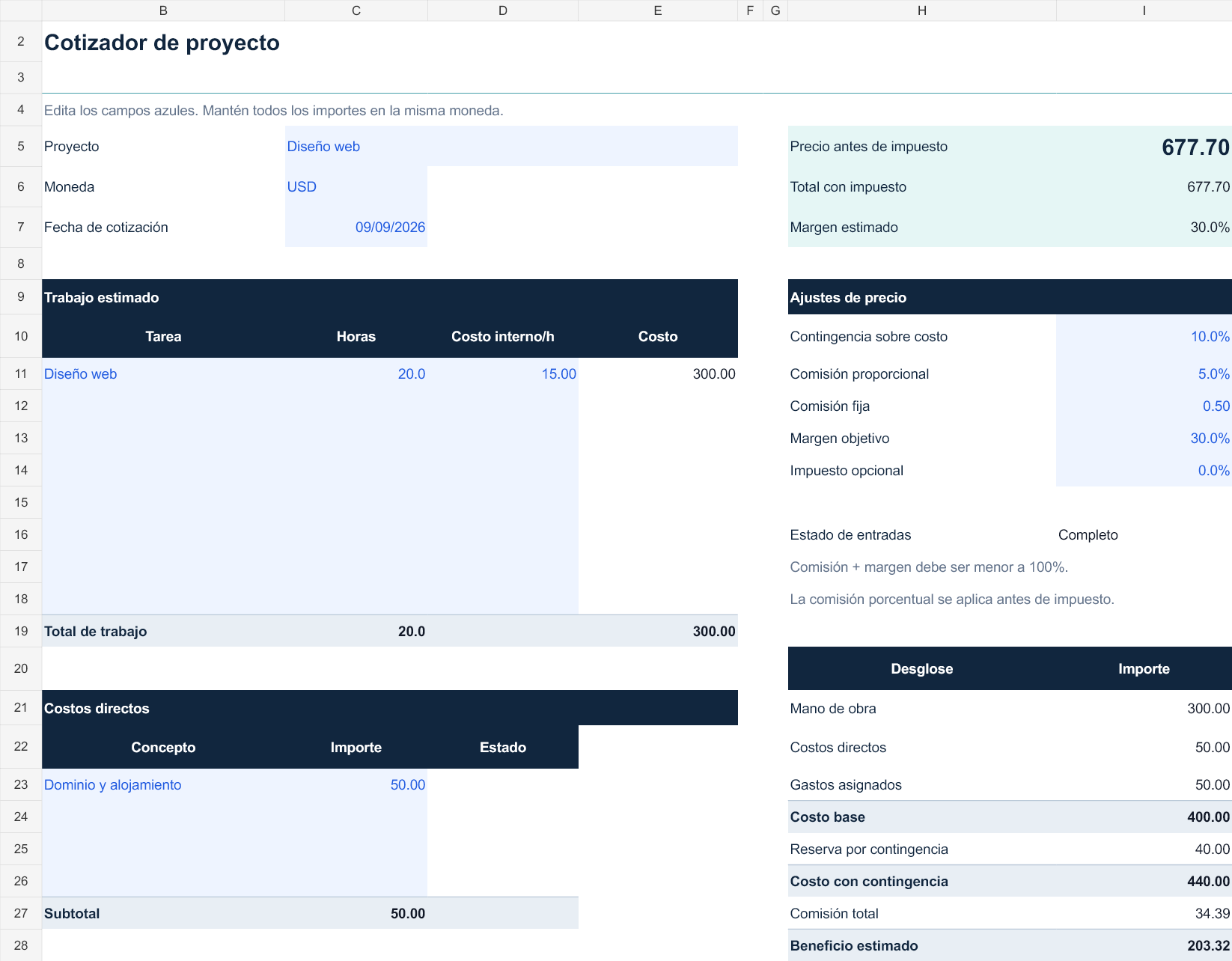
Spanish-language workbook with a cost breakdown, three pricing scenarios and tracking for 30 projects. Includes a catalogue of 46 currencies.
Interactive guide in English and Spanish, instructions and a licence. Export and import JSON files for a single quote or your library.
Choose what you need
| What you can do | Free calculator | Toolkit · US$19 |
|---|---|---|
| Calculate price, costs, fees and margin | Yes | Yes |
| Choose from 46 currencies, without conversion | Yes | Yes |
| Use the calculator in English or Spanish | Yes | Yes |
| Start with service examples | 3 examples | 18 examples · 6 services |
| Save and duplicate quotes | — | Up to 100 in your browser |
| Compare three adjustable scenarios | — | Yes |
| Prepare a client proposal | — | Print / save as PDF |
| Export and import JSON backups | — | One quote or a library |
| Work offline after downloading | — | Calculator + guide + Excel |
| Excel for costs and project tracking | — | Spanish · 30 projects |
You need a modern desktop browser for the calculator and an XLSX-compatible application for the workbook. Excel licences are not included. The HTML tool and Excel work separately; they do not synchronise. Storage is local, not in the cloud; keep JSON backups.
One useful idea in 26 seconds
See why adding 30% to your costs does not leave a 30% profit margin.
An English-narrated example with captions. It assumes a cost of US$100, with no fees or taxes. Try the same figures in the free calculator.
A 30% markup is not a 30% margin. A US$100 cost plus 30% markup gives a US$130 price. US$30 profit divided by US$130 is a 23.08% margin. For a 30% target margin, the price is US$142.86. This example has no payment fees or taxes. Try the free calculator at margenclaro.com. The toolkit costs US$19 as a one-time payment before tax.
Understand your numbers · guides in Spanish
See the difference with a cost of 100 and the calculation in full.
Read in Spanish →02 / Fixed pricingA sequence for scope, time, costs and terms.
Read in Spanish →03 / RevisionsWhat happens to your margin when the price is already agreed.
Read in Spanish →Freelancers and small businesses quoting services by project: design, web, consulting, content, video or translation, among others. It is not an invoicing or accounting system.
The calculator is available without registration and uses one currency per project. The toolkit is sold through Lemon Squeezy in its supported countries, subject to available payment methods. Availability and taxes are confirmed at checkout; the calculator does not apply your local tax rules.
No. It changes the displayed unit without changing the numbers. Enter all costs in the same currency. For example, if you switch from USD to EUR, you need to update the relevant amounts yourself.
It is your internal time cost before the profit you want to add. Using a rate that already includes that same margin could count it twice. Examples explain how the tool works; they do not set the rates you should charge.
The free calculator does not save your figures. The downloadable calculator lets you save them in the browser on your device; it does not make a cloud backup. JSON backups may include client information and costs: keep them private and share the client PDF instead.
A ZIP with the HTML calculator, Excel workbook, English and Spanish guide, instructions and licence. Download and unzip it, then start with LEEME-README.txt. Open Cotizador-MargenClaro.html in a desktop browser to use the calculator. No MargenClaro account is required.
The offline calculator and interactive guide are in English and Spanish. The Excel workbook and full website legal pages are in Spanish. The calculator works independently of the workbook, so you can prepare client proposals in English.
No. US$19 before tax is a one-time payment to use the files within one business. You can share the proposals and PDFs you create with clients. You cannot resell or redistribute the toolkit files.
It is an estimate based on your inputs. Extra hours, unexpected costs, refunds or new fees change the result. Review actual costs and agree on the scope before starting work.
Try your costs now. Take the complete workflow to your device when you need it.